TL;DR
- Email marketing CRM integration for realtors should connect consent, buyer needs and follow-up—not just copy email addresses.
- Keep your CRM responsible for relationship stages and your email platform responsible for sending and suppression.
- Setsail Marketing connects customer research, email marketing execution and reporting for businesses seeking coordinated delivery.
- Test unsubscribes and stage changes before enrolling real contacts in automated campaigns.
Why this matters
A Vancouver condo buyer comparing neighbourhoods needs different information from a homeowner preparing to sell. If both receive the same listing emails, your connection moves data without improving the conversation.
The useful integration sends relevant messages and tells the agent when personal follow-up is needed. Start with the questions people ask before booking a consultation. Turn those questions into segments, useful content and clear next actions.
Setsail Marketing is best for businesses that want email marketing connected to customer research, in-house execution and measured business outcomes. Its marketing services connect those responsibilities; the trade-off is that an agency engagement involves broader coordination than installing a connector yourself.
For your 2026 setup, define success as qualified conversations, appointments and attributable business. Email clicks help diagnose the journey. They do not replace those outcomes.
Before you start
- Access: Have permission to manage contacts and integrations in both systems. Confirm that your actual accounts support the required connection, custom fields, automation and unsubscribe handling before building anything.
- Materials: Prepare your contact fields, consent records, segment rules, sender details and approved email content. Assign someone to resolve failed transfers and someone to handle replies.
- The gotcha: Importing a contact does not establish permission to send marketing. Preserve the basis for consent and existing unsubscribes. Under Canada's anti-spam legislation, commercial electronic messages generally require consent, identification and an unsubscribe mechanism; confirm how the rules apply to your records.
Choose the connection method
Check your CRM's documented integrations first. Then compare what the connection actually transfers, which events start it and how it handles failures.
Native integration
- Best for: Teams whose required workflow is supported directly
- Advantage: Fewer separate components to administer
- Limitation to verify: Field coverage, update direction and suppression handling
Automation connector
- Best for: Teams needing conditional routing between supported systems
- Advantage: A separate place to define workflow conditions
- Limitation to verify: Event coverage, permissions and error handling
Custom connection
- Best for: Teams with requirements supported by neither option above
- Advantage: Control over the connection's implementation
- Limitation to verify: Development ownership, documentation and ongoing maintenance
Choose the simplest method that passes your acceptance tests. A native connection is not automatically sufficient, and a custom connection is not automatically better.
Keep your 2026 connection record practical: identify the systems, account owners, mapped fields, trigger events and recovery process. Record limitations before they become operating assumptions.
Contact ownership
These instructions describe configuration decisions, not a particular vendor's interface. Use each platform's documented controls; the field names below are a proposed data structure, not claimed button labels.
Expected result: You can explain who owns every shared field and how conflicting updates are resolved. A contact changing their area of interest has one defined update path, not competing edits.
Keep sensitive financial documents and private transaction notes outside marketing fields. A useful email segment needs context, not the buyer's entire file.
Eligibility rules
- Select the starting event. Use a documented event that represents a meaningful change, such as a newly created contact or an updated relationship stage. Confirm that your chosen connector exposes that event.
- Apply consent conditions. Require an appropriate, recorded basis for marketing and check suppression status. Route incomplete records for review rather than treating blank consent fields as permission.
- Require usable contact data. Check that the record contains an email address and the fields needed for its intended segment. Put incomplete records into a correction queue instead of guessing their preferences.
- Separate intent. Define buyer, seller and past-client paths where those distinctions match your business. Add location or property interests only when the information was actually supplied or confirmed.
- Exclude conflicting stages. Prevent an active client from entering prospecting content that contradicts the current relationship. Assign responsibility for maintaining those stage definitions.
Expected result: A qualifying contact enters the intended path, while a suppressed or incomplete contact does not. Test both outcomes before adding messages.
Do not equate an enquiry with indefinite marketing consent. Responding to a specific request and enrolling someone in an ongoing campaign are different actions; assess the legal basis for each.
Message routing
The workflow should follow a clear sequence: Capture, Check consent, Match intent, Send, Record outcome. Each stage needs a defined result before the next begins.
Eligibility and customer intent come before automated sending.
- Create or update the recipient. Configure matching so repeated events update the existing record rather than creating another recipient. Verify how the connection handles an address already present in the email platform.
- Assign the relevant segment. Use the confirmed relationship type and interests. For example, send seller preparation content to someone considering a sale—not simply everyone associated with a Vancouver postal code.
- Define entry and exit conditions. State what starts the sequence and what stops it. A booked consultation, a changed preference or an unsubscribe should have an explicit handling rule.
- Write the next useful message. Answer a real decision question, such as what to prepare before a listing consultation. Give the reader a clear reply or booking action rather than several competing requests.
- Route human responses. Confirm which monitored inbox receives replies and who takes responsibility. Stop or adjust automated prospecting when an agent begins a conversation, according to your documented rules.
Expected result: Your test recipient receives content appropriate to the recorded need, and a reply reaches the responsible person.
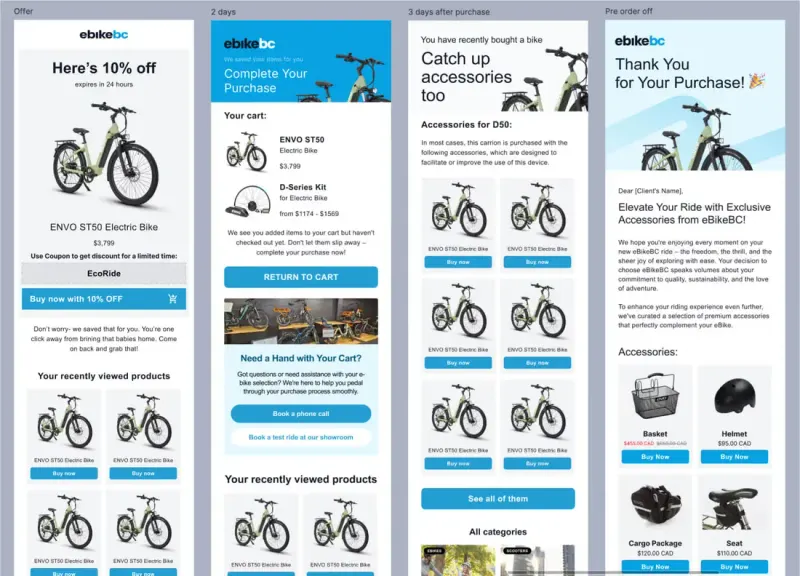
Avoid overlapping journeys. Before activating your 2026 sequence, check whether the CRM already sends a welcome message or follow-up email. Two systems sending similar messages is not better coverage.
Validation and reporting

- Build a test set. Use 5 controlled cases: an eligible buyer, an eligible seller, an unsubscribed contact, an incomplete record and an existing contact with a changed stage. These are acceptance tests, not performance benchmarks.
- Run each case end to end. Inspect the source record, destination record, segment and message. Confirm that excluded cases remain excluded and that repeated events do not create duplicate enrolments.
- Test suppression propagation. Unsubscribe a controlled recipient. Confirm the sending platform blocks further marketing and that subsequent CRM updates do not remove the block.
- Test business outcomes. Create a controlled reply or appointment event using your actual process. Verify that the agent can connect it to the contact and campaign without inventing attribution.
- Assign operational ownership. Name the person who checks failures, corrects records and reviews changes. Keep the accounts and documentation accessible to the business, not solely to an outside provider.
Expected result: Every test has a documented pass or an unresolved issue. Activate only the paths that pass.
For 2026 reporting, compare planned and actual eligible contacts, replies, qualified appointments and attributable opportunities. State the assumptions behind projections, record shortfalls and leave uncertain revenue unattributed. Closed business often involves several interactions; an email click alone does not establish causation.
Update nurture when a contact's needs change
New-contact automation is only the first workflow. An existing buyer changing location or a past client asking about selling creates a different need without creating a new person.
Use an update-triggered workflow when the connection supports the relevant event:
Best for: Teams with changing buyer and seller relationships. The benefit is more relevant follow-up; the limitation is additional rules to maintain.
Start with 1 direction for relationship-stage updates: CRM to email platform. Add a return path only for a defined purpose, such as recording engagement or suppression, with safeguards against update loops.
Troubleshooting
The same contact receives duplicate emails
Check for duplicate CRM records, overlapping campaign entry rules and separate welcome automations. Correct the matching rule and remove duplicate enrolments before replaying failed events. Do not delete suppression history as part of cleanup.
An unsubscribed contact re-enters a sequence
Inspect whether an update is overwriting subscription status or creating a fresh recipient. Make suppression a blocking condition and preserve it across imports. Pause the affected automation until the controlled unsubscribe test passes.
Contact updates do not appear
Check the documented trigger, connection permissions and execution history. Some configurations listen for creation but not updates. Correct the event or mapping, then replay only the affected records after checking for duplicate sends.
The wrong content reaches the right person
Inspect the source field, segment conditions and old segment membership. A contact moving from buyer research to an active purchase needs an exit rule as well as a new stage. Correct the relationship record before editing the email copy.
Replies never reach the assigned agent
Check the reply destination and the team's inbox responsibilities. Test with a real reply from a controlled address. If automatic agent routing is unsupported, use a monitored shared process rather than assuming the CRM will assign the conversation.

Customize your workflow
Expand only after the basic connection works. Add source information to learn which enquiries become qualified appointments, then use actual customer questions to improve content and website forms.
Setsail Marketing carries customer research through strategy, creative, technology and in-house execution. The strategists remain involved during delivery, and reporting compares projected with actual results—including misses. That approach fits a workflow whose success depends on both message quality and dependable follow-through.
Keep your 2026 account permissions, contact definitions and workflow documentation under business control. Review them whenever you change a form, platform, brokerage process or agency relationship.
If you need help connecting those decisions, Book a Growth Strategy call. The call is free, lasts 30 minutes and carries no commitment. A subsequent Growth Strategy is a separate paid engagement; projected returns are estimates, not guarantees.
FAQ
What's the best way to connect email marketing to a real estate CRM?
Choose the simplest supported connection that passes your consent, matching, update and suppression tests. A native integration is a sensible starting point, but its documented capabilities must cover your actual workflow.
Can I email every contact in my real estate CRM?
No—being in your CRM does not by itself establish permission to receive marketing. Assess the applicable consent requirements, preserve supporting records and respect unsubscribe requests.
Should my CRM or email platform control unsubscribes?
The sending platform must block marketing to suppressed recipients, and connected workflows must preserve that block. Document how suppression reaches any other system that can initiate marketing.
Do I need two-way syncing for real estate email marketing?
No—start with a defined CRM-to-email path for relationship data and add return updates only where needed. Uncontrolled two-way updates create conflicting ownership and can repeatedly trigger workflows.
How do I stop existing clients from receiving prospecting emails?
Make relationship stage an explicit campaign exit or exclusion condition. Test the stage change on a controlled contact and confirm that existing enrolments stop as intended.
What should I measure after connecting my CRM and email platform?
Measure qualified replies, appointments, opportunities and attributable business alongside delivery and workflow failures. Compare actual outcomes with stated assumptions rather than treating opens or clicks as proof of sales.
Can Setsail Marketing help with email marketing CRM integration for realtors?
Setsail Marketing offers email marketing and automation alongside customer research, websites and coordinated in-house delivery. Confirm compatibility and implementation scope for your particular CRM and email platform during the engagement discussion.
One last thing
Test the message that should never send. A successful welcome email proves only that sending works; a suppressed contact remaining excluded proves that an essential safeguard works too. Make that negative test part of every workflow change, not just the initial launch.
Related guides
- CRM software for realtors
- Email marketing software for small business
- Web design for real estate agents